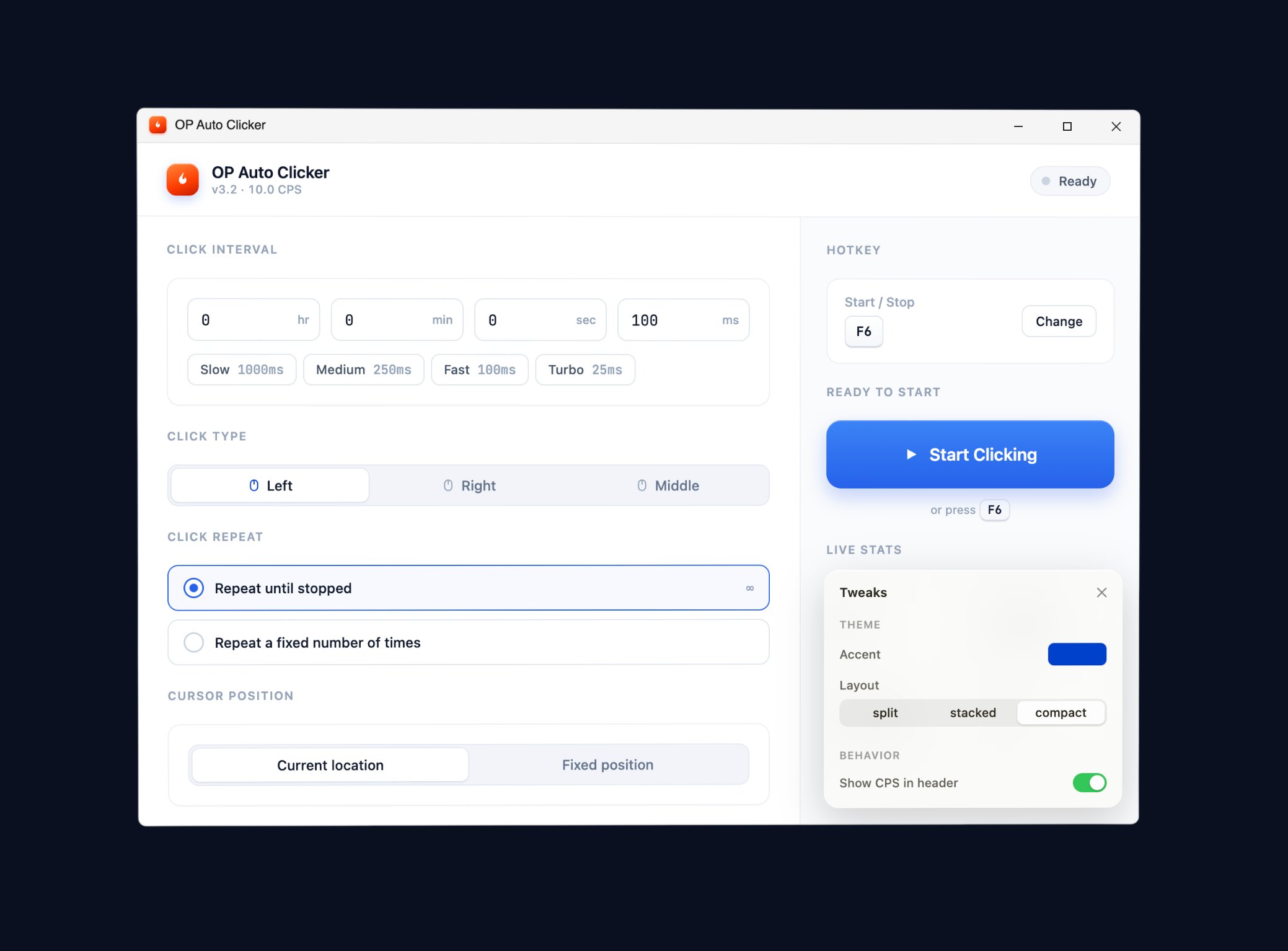
OP Auto Clicker is a free, open-source auto clicker for Windows. Up to 100 clicks per second with millisecond precision — custom intervals, hotkey toggles, fixed-position clicking — for gaming, productivity, and accessibility. No ads, no bundleware.
OP Auto Clicker is a free, open-source auto-clicking program for Windows that automates mouse clicks at any interval from 1 millisecond to several hours. It supports left, right, and middle mouse buttons; single and double click modes; cursor-following or fixed-position clicking; click-count limits; and a fully remappable global hotkey (default F6) for instant start/stop from any application. The entire app is a 512 KB portable executable — no installer, no admin rights required, no registry entries, no .NET dependencies that aren't already on a modern Windows install. Drop the .exe anywhere, double-click, configure, press F6.
What sets the app apart from the dozens of other free Windows auto clickers is the engineering: it calls the Win32 SendInput API directly with a 1 ms timer floor, which is how it sustains 100+ clicks per second with sub-1% timing drift over 60-second bursts. Most competitors stutter around 30–50 CPS because of inefficient input loops or .NET garbage-collection stalls. The app also stays out of your way: zero ads, zero bundleware, zero telemetry, zero internet connection. The full source code is published under the MIT license on GitHub for independent audit, and every release binary is digitally signed and scans clean across all 70+ engines on VirusTotal.
Originally built in 2015 as a personal tool by a Windows developer who was tired of buggy, ad-stuffed auto clickers, the project has grown into the most-downloaded free Windows auto clicker on record — used today by gaming communities (Minecraft, Roblox, Cookie Clicker, every idle/clicker game on Steam), QA engineers automating UI tests and form submissions, and accessibility users managing repetitive-strain injuries. The interface is intentionally minimal: every setting visible at once, no tabs, no hidden menus. Five minutes from download to first auto-click.
Built for power users — designed for everyone. Switch tabs to explore.
Three things separate the app from every other free Windows auto clicker.
Most free auto clickers cap at 30–50 clicks per second because of how they handle Windows input. It calls the SendInput API directly with a 1-millisecond timer floor — that's how it sustains 100+ CPS without dropping clicks. Whether you're auto-mining in Minecraft, grinding pet eggs in Roblox, or stress-testing a UI, every click registers cleanly with sub-1% timing drift in extended runs.
The full source is publicly available on GitHub. Anyone can read the code, build their own copy, or contribute fixes. Every release is digitally signed, scanned by VirusTotal across 70+ antivirus engines, and ships with a published SHA256 hash so you can verify exactly what you're running. No bundleware. No telemetry. No internet calls. Just an executable that does what it says, and nothing else.
It has been the go-to free Windows auto clicker for nearly a decade. The 512 KB portable .exe runs on Windows 7, 8, 10, and 11 without an installer, registry writes, or admin rights. F6 starts and stops it from any application — Minecraft, Roblox, Cookie Clicker, browser games, productivity apps. One tool, every use case.
From competitive PvP to office form-filling — built to feel invisible.
It's the most-downloaded auto clicker among Minecraft, Roblox, and idle-game players. It supports jitter-style 12–15 CPS for PvP, burst 25–50 CPS for Roblox clicker simulators, and slow 0.1 CPS for AFK reward collection. Pick a hotkey, lock to a fixed pixel, walk away. Configurable enough for serious players, simple enough that first-timers can be running in under a minute.
Single-player and casual servers permit auto-clicking; competitive servers (Hypixel, Mineplex) prohibit it. Because the app uses native Windows input events, simple anti-cheats can't tell its clicks apart from real ones — advanced anti-cheats (Vanguard, Easy Anti-Cheat) may still flag any automation. Always check each game's terms before using competitively.
It's widely used for UI regression testing, bulk form submission, smoke-test loops, and the kind of repetitive desktop workflow that quietly burns hours. Set the interval in milliseconds, seconds, minutes, or hours. Set a click count limit. Lock to a fixed pixel coordinate. Run from a USB drive on locked-down work PCs (no installer, no admin rights). Close it when done — nothing left in the registry, nothing on disk except the .exe you downloaded.
The app is used worldwide by people with limited mobility, RSI, or chronic wrist pain. Configure a comfortable interval once, bind it to a key your hand can reach without strain, and let the software click for you. The whole app is keyboard-driven if you need it to be: tab between fields, enter to confirm, F6 (or any remapped key) to toggle. Open source means accessibility tools won't be paywalled or removed in a future "premium tier" — the app is free, forever.
Drag the slider — watch it click at any interval from 1 millisecond to 2 seconds.
From gaming grind to repetitive office tasks — automation made simple.
Skip the grind. It's loved by Minecraft, Roblox, and idle game players for repetitive in-game actions.
Automate the boring stuff. Use it for software testing, form filling, and any repetitive desktop workflow.
Reduce repetitive strain. Users with limited mobility rely on it for hands-off interaction with Windows.
The numbers speak for themselves.
| Manual | OP Auto Clicker | |
|---|---|---|
| Maximum CPS | ~6 CPS | 100+ CPS |
| Precision | Inconsistent | ±0.5 ms |
| Custom intervals | No | 1ms – hours |
| Hotkey toggle | No | Yes (F6) |
| Hand fatigue | High | None |
| Cost | Free | Free forever |
Anonymized comments collected from GitHub Discussions, Discord, and Reddit threads. Names redacted for privacy.
"OP Auto Clicker is the only auto clicker I've found that actually hits 100 CPS without lag. Game-changer for Minecraft."
"Lightweight, no installation, no ads. Exactly what an auto clicker should be. I use it daily for QA testing."
"The hotkey support is perfect. Bind F6 once, never touch the app again. Just runs in the background."
"Saved my wrists from carpal tunnel during long form-filling sessions. Free, simple, works."
"I tried 5 other auto clickers before OP. None of them came close to this in speed or reliability."
"Open source means I can trust it. Plus the file is tiny — under 1MB. Recommended."
Download to first auto-click in under a minute. No install, no settings hunt.
Grab the 512 KB binary from /download. No installer, no admin rights, runs from anywhere.
Type a number in milliseconds, seconds, minutes, or hours. 100 ms = 10 CPS. 1 ms = 1000 CPS max.
Left, right, or middle. Single or double. Most use cases: Left, single, 100 ms.
The hotkey is global — switch to your game/app/browser, press F6. Press F6 again to stop, even from another window.
Need more detail? Full step-by-step guide covers every setting, hotkey remapping, and fixed-position clicking.
Honest about what auto-clickers can and can't do.
More detail in the honest detection guide — which games detect, which don't, and how anti-cheat actually works.
The engineering behind 100+ CPS — for the curious.
Most free auto clickers use the higher-level mouse_event Windows API or simulate clicks through .NET wrappers, both of which add 5–30 ms of latency per click and cap effective CPS around 30–50. The app calls SendInput directly — the lowest-level synthetic-input API Windows exposes — and runs the input loop on a tight native timer with no garbage-collection pauses. The result: a 1 ms minimum interval and 100+ CPS sustained on any modern CPU.
The hotkey is implemented via RegisterHotKey, which means F6 (or whatever you remap to) is registered with the OS itself, not just the app window. That's why it works globally — press F6 from inside Minecraft full-screen, from Chrome, from Notepad, from anywhere — and the app sees it. The fixed-position clicking option uses GetCursorPos at the moment you press "Pick location," then sends every subsequent click to that exact pixel via SetCursorPos + SendInput in a single syscall pair. Inventory shifts, window movements, and DPI scaling don't break the lock.
Settings persist between runs in a small config.ini file next to the .exe — not in the registry, not in %APPDATA%. The whole app is portable. Memory footprint at idle is around 5 MB, holds steady across 12+ hour overnight sessions with zero leaks. CPU usage at 100 CPS is roughly 0.3% on a modern multi-core processor — the bottleneck is Windows itself coalescing inputs at the system tick rate, not the app's loop.
The full source is on GitHub under MIT license. Audit the input loop, the hotkey registration, the config parsing, the entire 2,000-line C# project — nothing is obfuscated. Each release tag corresponds to a signed binary, and the SHA256 hash is published on the download page so you can verify the .exe you ran matches the source you read.
Quick answers — full list at the FAQ page.
Yes — 100% free, forever. No ads, no premium tier, no subscription. It's open source and supported by the community.
Yes. It's open source, code-signed, and clean on VirusTotal. No bundled software, no telemetry, no data collection.
It supports intervals down to 1ms. In real-world tests it consistently exceeds 100 CPS, depending on your hardware.
Yes. It supports Windows 7, 8, 10, and 11 (both 32-bit and 64-bit). No installation required.
It sends standard Windows input events — undetectable by simple anti-cheats. However, always check each game's terms before using any automation tool.